Hi there, {{ first_name }}.
My Obsidian is feeling more like Jarvis...
Here's what's inside:
- My Obsidian evolved yet again - the Obsidian CLI
- The pigeons have decided - giveaway winners announced
- New video - my new favourite "save for later" app
My Obsidian Evolved Again
At this point I feel like a Pokémon trainer watching Charmander become Charizard.
Every evolution unlocks a new ability.
Obsidian gave me structure.
Claude Code gave me read, write, think.
Wispr Flow gave me hands-free capture.
This evolution? It learned a new move: control the screen.
|
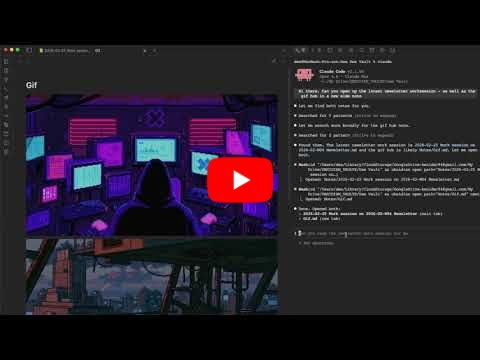
Claude Code lives in my terminal.
Obsidian lives in its own app.
I've been running them side by side for months, and Claude has learned exactly how my vault works. It reads my notes, creates new ones, logs my day, and processes meetings.
Claude could do everything behind the scenes, but it had no way to control what I was actually seeing on screen. It couldn't open a note for me. It couldn't navigate.
Then I found the Obsidian CLI (Command Line Interface).
"Anything you can do in Obsidian can be done from the command line."
It’s built directly into Obsidian (not a plugin), bridging your terminal and Obsidian and letting anything running in your terminal, like Claude, control what happens on your screen.
---
You know that scene in Iron Man where Tony talks to Jarvis and everything just appears?
“Pull up the schematics.”
“Enhance.”
“Cross-reference with last Tuesday.”
Holographic screens flying around. Data surfacing exactly when he asks for it. He never clicks. He never searches. He just speaks, and the system responds.
That's the vision. That's where this is going.
Before the CLI, I had Jarvis locked in the basement.
He could do the research, crunch the numbers, write the report.
He just couldn't put anything on my screen.
Now Jarvis has access to the holographic screens.
“Jarvis, process this meeting.”
Summary created. Action items extracted. Note opens.
“Jarvis, open the lasagne recipe.”
There it is.
“Jarvis, log gym, 45 min biceps.”
Logged. Note opens.
“Jarvis, find the last two Charmander feet pics.”
Both open. Right in front of me.
No searching. No clicking. No sweating through your folder structure like a drug addict tearing apart the couch cushions looking for the next hit.
I speak. Immediate relief.
With every upgrade like this, Claude gets more powerful. But here's the thing about power:
you can't multiply by zero.
If your vault is empty, Jarvis has nothing to pull up on those holographic screens. No notes to open. No meetings to reference. No recipes to find.
All that functionality, and your Jarvis is just standing in the corner staring at his feet. Granted, they are handsome feet.
But if you've been building, even casually, your system just learned to talk back.
And it has a lot to say.
---
If you want to hand your system its next evolution, I run Claude and Obsidian workshops regularly.
In the workshop, we run through different use cases to get the gears turning on how you can use this inside your life and your Obsidian:
-
Meeting processing
-
Source processing
-
Daily logging
-
Work sessions
-
Content creation
You pick the ones that fit your workflow.
---
The course that comes with the workshop teaches you exactly how to upload each skill.
Think Neo in The Matrix:
“I know kung fu.”
Except it's:
“I know meeting processing.”
Upload. Done.
Each skill is a new ability your vault didn’t have five minutes ago. You simply choose which ones you want to learn.
If you'd rather skip the learning curve and have it all working by the end of the day, book a one-on-one consulting session and we'll set everything up in one go.
---
A quick note on these AI tools
I know I’ve been talking a lot about AI in knowledge management lately. That’s because I genuinely believe this is the next evolution, not a trend.
I hear the privacy concerns. We’re actively working toward running these tools locally so your data stays yours.
Even if you’re not ready to evolve your Pikachu yet, at least be aware of what’s possible for when you are.
The Pigeons Have Decided
Last week we hit 5K YouTube subscribers and 1K newsletter followers. To celebrate, I ran a small giveaway: reply with your PKM journey and win a free product.

The pigeons picked three winners.
Here’s what they chose:
- Judy: 3-session build
- Pedro: 1-on-1 consulting
- Carl: Evergreen setup
I love that all three picked something different. That tells me you’re all at different stages of this journey, which is exactly why I keep building these offerings.
Thanks for being in my little corner of the inter-of-webs.
---
Side note: between the giveaway winners and existing clients, my March consulting slots are full.
If you’ve been thinking about a session, reply to this email and I’ll put you first in line when new slots open up.
New Video
Recall is quickly becoming my “save for later” app of choice. It’s my first line of defense before anything enters Obsidian, and it feels symbiotic rather than redundant.
This video explains why.
 |
---
Until next week,
Strength and Honour,
Dee
Construct By Dee - Website


Responses