Seven days into 2026, one thing is already clear:
this year is about reducing friction.
Less time organising.
More time thinking.
Here’s what’s inside for you this week:
- Claude Code + Obsidian: capture and retrieval on autopilot
- A small daily note tweak I think you'd like
- Project.base video incoming (Base video 3 of 4)
- The Study System, now live
Claude + Obsidian
What if capturing and retrieving notes in Obsidian took no effort?
That’s what Claude Code enables. Your vault structure stays exactly the same, but Claude handles the repetitive work. You stay focused on thinking, not housekeeping.
With a single prompt, Claude can:
-
create new notes
-
use the correct templates
-
fill in YAML fields (up, tags, summary)
-
log everything to your daily note
It’s been surprisingly reliable.
I spent the last 48 hours setting this up from scratch and documenting everything so you don’t have to trial-and-error your way through it. Over the next few weeks, I’ll publish videos specifically for Obsidian users who’ve never touched Claude Code before.

I’ll likely run a hands-on Claude + Obsidian workshop soon for people who want to set this up properly.
Daily note - new banner, who this?
The Journals plugin has a small but powerful feature: a calendar timeline banner that shows your entire week without leaving your daily note.
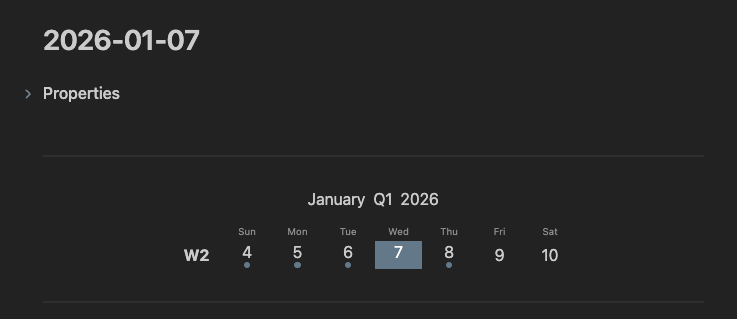
To enable it, add this code block at the top of your daily note
(requires the Journals plugin):
---
```calendar-timeline
mode:week
```
---
Project.base (Base video 3 of 4)
Base has quietly simplified project management in Obsidian.
One project.base is enough to run all your projects.
Instead of rebuilding structure every time, each project follows the same underlying shape. Meetings, notes, logs, tasks, and context stay consistent without forcing your vault into something rigid.
The full walkthrough video drops next week. If you want a head start, here’s the blueprint behind it:
 |
The Study System is live
This is not an Obsidian setup.
It’s a study system that happens to live inside Obsidian.
The biggest change for students using this wasn’t better notes. It was that organisation stopped competing with studying. Once the structure was in place, they no longer spent time deciding where things belonged or how to review them. They just studied.
When that overhead disappears, studying feels easy, even when the material isn’t.
If you’re studying for something serious, this will noticeably reduce friction:
https://www.constructbydee.com/Obsidian-study-system
Last call: 2025 year-end review
Without a pause, 2026 quietly inherits the same direction as 2025.
If you haven’t done a year-end review yet, you can grab the prompts here:
https://www.constructbydee.com/free-year-end-journal-prompt-file
A few that tend to hit hard:
-
Three words to summarise the year
-
What makes my days great? What ruins them?
-
What didn’t I finish, and why?
-
What am I most proud of?
Before building better systems for 2026, it helps to see what you’re actually carrying forward.
Until next week,
Strength and Honour,
Dee
PS The 3-session Personal Obsidian System build maps your life and work, translates it into Obsidian, and refines it into a stable daily workflow.
Elsewhere:
Website · YouTube · Substack · Medium · Twitter (X)


Responses